
Squarespace Made Simple: Real Answers to the Most Searched Questions and Hidden Costs
The most searched Squarespace questions usually come from business owners who want clear, trustworthy answers without the overwhelm.
This guide explains the most common Squarespace questions with real pricing, simple steps, and helpful insider tips. If you ever want support, I offer website setup and refresh services starting at $700.

Before You Start: What You Need Ready
Preparing a few things ahead of time makes the Squarespace process smoother.
Brand colors
Logo files
Website copy or outlines
Organized images
Domain login details
A simple page list
Insider Tip: You do not need everything perfect. Squarespace is flexible, and you can adjust as you go.
1. Squarespace Pricing and Plans
Squarespace pricing is one of the most searched Squarespace questions because people want to understand the real costs before they commit. Choosing the right plan helps you avoid paying for features you do not need.
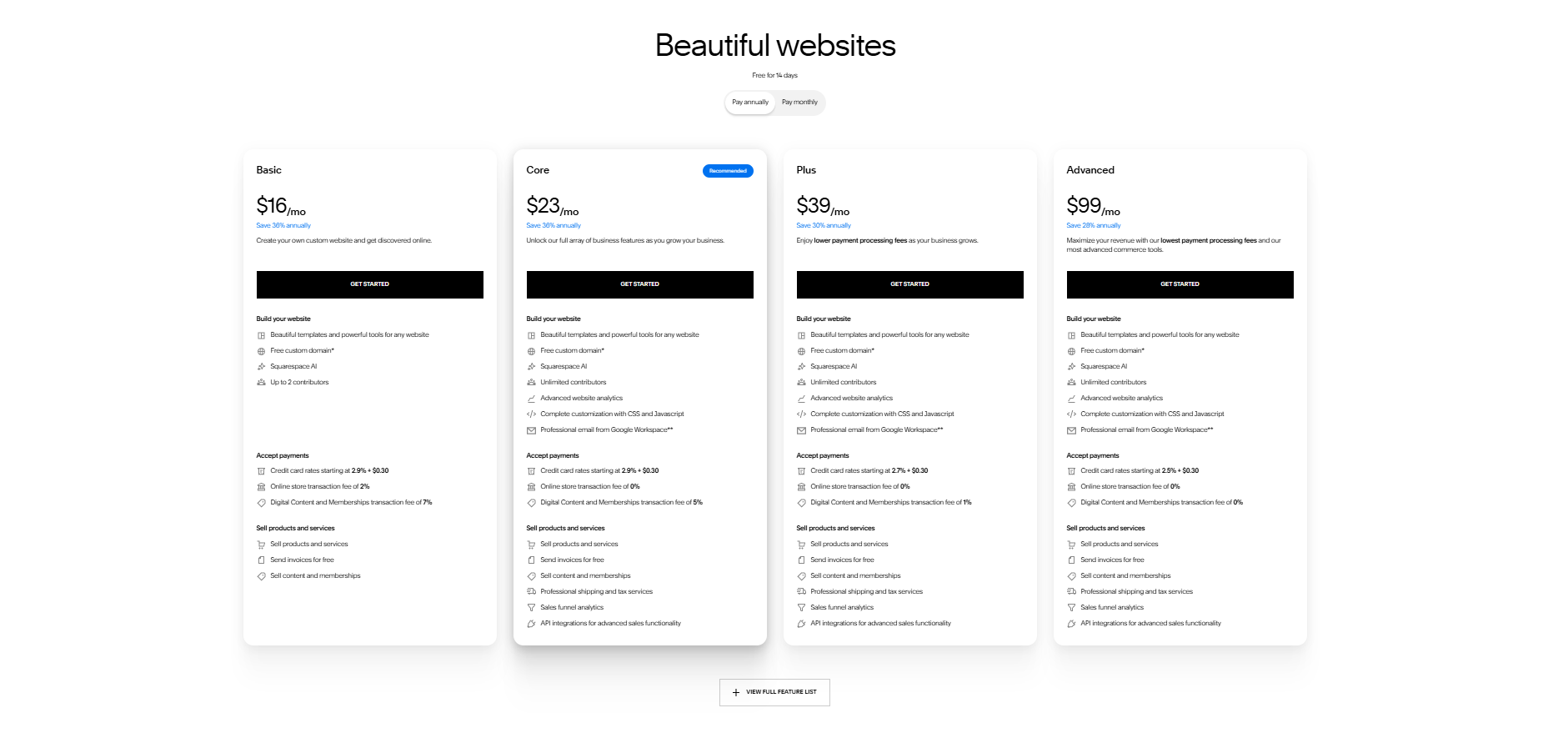
Squarespace Website Plan pricing 2026
Squarespace Plan Costs (Annual Pricing)
Personal: $16 per month
Business: $23 per month
Commerce Basic: $27 per month
Commerce Advanced: $49 per month
Squarespace Plan Costs (Monthly Pricing)
Personal: $23 per month
Business: $33 per month
Commerce Basic: $36 per month
Commerce Advanced: $65 per month
Which Squarespace Plan Do You Need
Most service providers choose the Business plan because it includes custom code, scheduling, and integrations. Ecommerce shops usually choose Commerce Basic.
Insider Tip: If you plan to sell even one digital product, start with the Business plan. It saves you from upgrading later.
Common Squarespace Pricing Mistakes
Choosing Personal when you need Business features
Paying monthly instead of annually
Forgetting about Stripe or PayPal fees
Assuming Commerce is only for physical products
2. Squarespace Templates and Design

Squarespace Templates 2026
Squarespace templates are one of the most searched Squarespace questions because people want their website to look beautiful from the start. A Squarespace template is the starting layout for your site. It gives you a predesigned structure so you do not have to build every page from scratch.
A template includes preset fonts, colors, and layouts, but everything can be customized. You can update the styling, swap images, adjust spacing, and redesign entire sections.
In Squarespace 7.1, all templates use the same system. This means every template has the same features and design capabilities. If your site needs a visual refresh, my Style and Cohesion Refresh ($1,800) helps create a more polished look.
Insider Tip: Choose a template based on layout, not demo photos. Your branding will change everything.
Template Myths Most Beginners Believe
Some templates have more features
You need the perfect template
You cannot change the layout later
Your site will look like the demo
All false. Squarespace 7.1 is fully flexible.
How to Customize Your Squarespace Template
Change Fonts
Design → Fonts
Change Colors
Design → Colors
Adjust Spacing
Hover → Pencil icon → Spacing
Hide a Page
Pages → Drag to Not Linked
3. Squarespace Website Setup and Editing
Website setup questions are some of the most searched Squarespace questions because beginners want clear steps. Squarespace is user friendly, but the small details can feel confusing at first.
How to Start a Squarespace Website
Create an account
Choose a template
Add your branding
Build your core pages
Add your copy
Connect your domain
Launch
If you want someone to build the foundation for you, my One Page Website starts at $700.
Insider Tip: Start with fewer pages. You can always add more later.

Why Your Mobile View Looks Off
Too much spacing
Images without focal points
Long text blocks
Overlapping sections
How to Edit Mobile View
Spacing → Pencil icon Focal points → Edit image Mobile styles → Design → Site Styles
4. Squarespace Domains and Email

Domain setup is one of the most searched Squarespace questions because it feels technical. Once you understand the steps, it becomes simple.
Domain Costs
Squarespace domains: $20 to $70 per year
Google or Namecheap: $12 to $20 per year
Domain transfers: Free
How to Connect a Domain
Settings → Domains → Use a domain I own → Add DNS records
Insider Tip: DNS changes can take up to 48 hours. Slow updates are normal.
The Real Reason Your Domain Will Not Connect
DNS records not saved
Wrong provider selected
Old domain still locked
Missing verification record
How to Set Up Google Workspace Email
Settings → Email → Google Workspace → Get Started
5. Squarespace Ecommerce and Payments
Ecommerce setup is another highly searched Squarespace question because business owners want to sell products or services with confidence.
Squarespace Commerce Costs
Business plan: 3% fee
Commerce plans: 0% fee
Payment Processor Fees
Stripe: 2.9% plus 30 cents
PayPal: 2.9% plus 30 cents
How to Add Products
Commerce → Inventory → Add Product
Insider Tip: Use square, high quality product photos for the cleanest layout.
Common Ecommerce Mistakes
Uploading inconsistent image sizes
Forgetting product categories
Not adding SEO titles
Skipping shipping setup
How to Connect Stripe or PayPal
Commerce → Payments → Connect
If you want help setting up your shop, I offer an Ecommerce Setup Add On ($300).
6. Squarespace SEO and Marketing
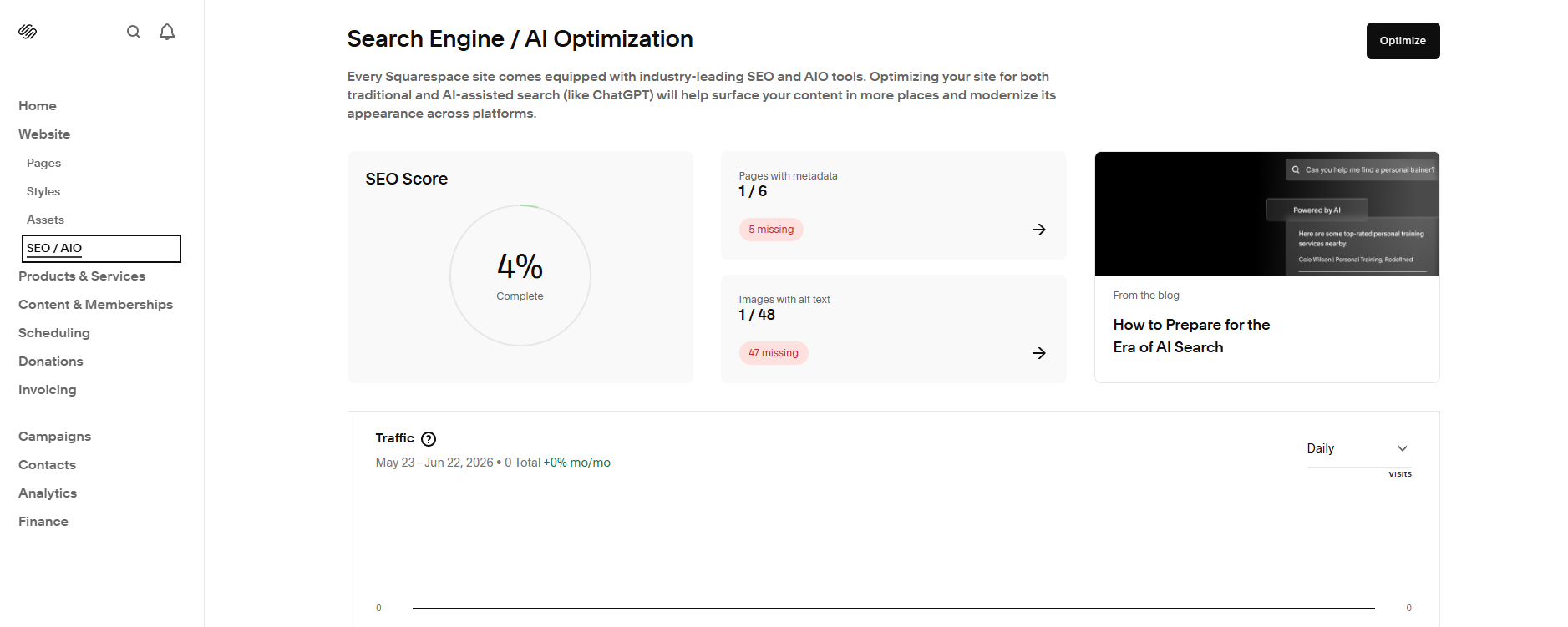
SEO is one of the most searched Squarespace questions because people want their website to show up on Google. Squarespace includes built in SEO tools that help your site get found.
SEO Costs
Included for free.
How to Add Meta Descriptions
Pages → Gear icon → SEO → Description
Insider Tip: Write meta descriptions like a mini invitation. One keyword. One benefit.
Is Squarespace Good for SEO
Yes. Squarespace has clean code, mobile friendly layouts, and built in SEO fields. Your content matters more than your platform.
How to Connect Google Search Console
Settings → Connected Accounts → Google
7. Squarespace Images, Video, and Styling
Images are one of the biggest pain points for beginners. Cropping, spacing, banner sizes, and video backgrounds are all common search topics.
Video Background Costs
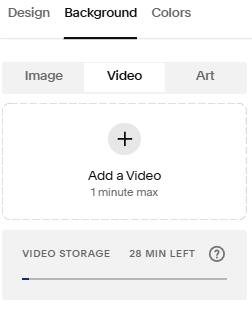
Your own MP4: Free
Stock video: $10 to $50
How to Fix Mobile Image Cropping
Edit image → Adjust focal point
Insider Tip: Always set your focal point before adjusting spacing.
What to Avoid With Images
Uploading huge files
Using inconsistent image shapes
Adding text inside images
Using dark photos with low contrast
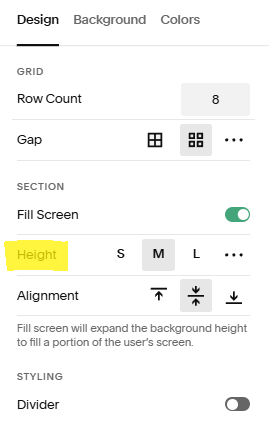
How to Change Banner Image Size
Section → Pencil icon → Section Height
How to Add Video Backgrounds
Add section → Video → Upload MP4
DIY vs Hire Help
DIY if:
You enjoy learning tech
You have time to experiment
Your site is small and simple
Hire help if:
You want a polished, branded look
You want it done quickly
You want strategy, not just design
My setup packages start at $700, and refreshes start at $700.
How Long Each Step Takes
Choosing a plan: 5 minutes
Setting up a template: 20 minutes
Adding branding: 30 minutes
Building core pages: 1 to 3 hours
Connecting a domain: 10 minutes
Basic SEO setup: 15 minutes
Tools I Recommend
Image compression: TinyPNG
Color palette: Coolors
Copywriting: Hemingway Editor
Brand organization: Google Drive folders
Beginner FAQs
Do I need coding
No. Everything is drag and drop.
Can I switch templates
In 7.1, you switch layouts, not templates.
Is Squarespace good for SEO
Yes. Your content matters more.
How do I make my site look professional
Consistent spacing, clean fonts, and high quality images.

What Is Included in My Website Packages
Strategy
Layout
Branding
Mobile optimization
Domain connection
Basic SEO
Launch support
Packages start at $700.
What to Do After Launch
Update images
Add new content
Refresh SEO
Check analytics
Keep your site organized
My upkeep plans start at $150 per month.
Last Thoughts and Key Takeaways
Squarespace becomes much easier once you understand the basics. Pricing is clear, templates are flexible, domains are manageable, and SEO tools are built in. You can absolutely build a beautiful website on your own.
Here is the quick TLDR:
And if you want support, here are the services that make everything easier:
Squarespace pricing is straightforward once you see the real numbers.
Templates are flexible and fully customizable.
Mobile issues usually come from spacing or focal points.
Domains look scary but are simple with the right steps.
SEO tools are built in and free.
Ecommerce setup is easier than it looks.
Images behave differently on mobile, so focal points matter.
Catch up on All My Blogging Related Blog Posts Here.
You’ll Also Love




Hello, world! I’m Lourin. I’m a Kansas City mama, creative, and website designer who loves helping small businesses and community leaders show up with clarity and confidence. Here on the blog you can read about my favorite things, like small business growth, simple website tips, community stories, and the behind‑the‑scenes of building a life and business I love. So glad you’re here!



Boost Your Squarespace SEO in 48 Hours with Google Search ConsoleQuick guide to connect Google Search Console to Squarespace so you can see your real search keywords fast. See real keyword data, track impressions and clicks, and understand how people find your site. This simple setup helps you improve your SEO fast and make smarter updates over time.